Endoscope Camera Connector
FastSoftLibraries & Demo
3.61.29K Reviews
- Version
- 29
- Installs
- 100.00K
- Age Rating
- Everyone
Screenshots
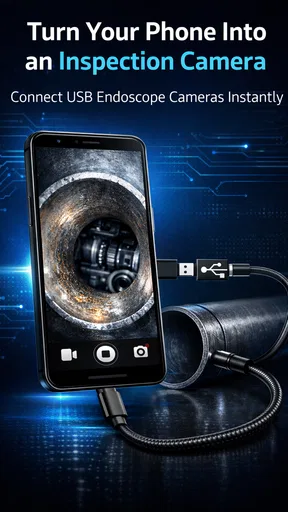
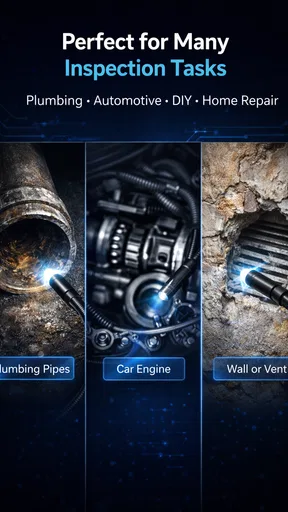
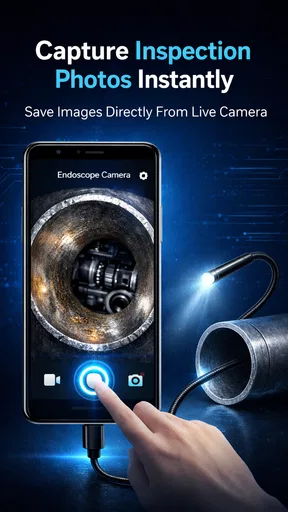
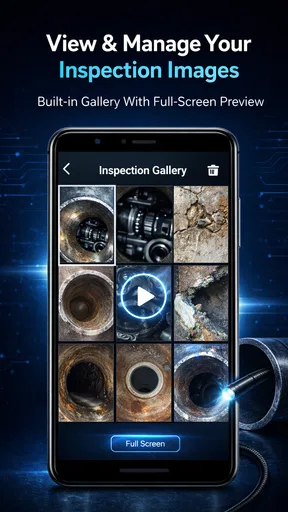
Our Review of Endoscope Camera Connector
 Analysis by Appyee
I approached Endoscope Camera Connector as a practical tool rather than a polished camera replacement. Developed by FastSoft, this free Android app sits in the Libraries & Demo category and is designed to display video from a compatible USB OTG endoscope or borescope. That purpose is narrow, but it can be genuinely useful when you need to look into a drain, behind furniture, inside a narrow gap, or around a small mechanical part.
My first impression is that the app makes most sense when treated as the viewing window for inspection hardware. The phone is not doing the exploring by itself; the connected camera does that work. The application’s job is to help you see what the probe sees, and that distinction matters when deciding whether it is right for you. If you already own a compatible USB inspection camera, this may be a convenient way to use it. If you expect the app to turn an ordinary phone into an endoscope, it will not meet that expectation.
How the current version fits into everyday inspection work
The current release is version 24, and the app has been available since July 2, 2020. That history gives it a useful sense of continuity, although I would not mistake an established release for a guarantee that every modern phone and every inexpensive camera will work perfectly together. USB accessories vary considerably, and the physical connection is often just as important as the application itself.
In practice, I would keep the workflow simple: connect the USB OTG adapter to the phone, attach the endoscope camera, open the app, and check whether the live image appears. I recommend doing this before starting a repair or inspection. Testing the setup on a table quickly reveals whether the phone recognizes the accessory, whether the camera receives enough power, and whether the image is usable in the intended space.
The most important limitation is compatibility, not the viewing screen. A phone may support USB OTG while still failing to cooperate with a particular camera. The connector type, the adapter, the camera’s USB behavior, and the phone’s own accessory support all play a role. This is why I see the app as a useful part of an inspection kit, not as a universal solution that removes the need to check hardware compatibility.
For a quick household task, that arrangement can be perfectly adequate. Imagine a small object slipping behind a cabinet. With a flexible probe connected, I could use the phone display to search the dark gap without moving the heavy furniture immediately. The same approach can help when checking whether a cable has fallen behind a desk or when looking for an obstruction in a difficult-to-reach corner.
What the app is good at when the connection works
The strongest use case is live visual access to places that are too narrow, dark, or awkward for a normal phone camera. The display gives you a more practical view than trying to hold a handset at an impossible angle. For basic inspection, that is the real value: less guesswork and fewer attempts to position your head, flashlight, and phone at the same time.
I also like the possibility of using the phone as a shared screen. During a simple repair, one person can guide the probe while another watches the display and explains what is visible. That is more useful than passing a tiny camera module around, especially when the person handling the cable cannot also see the end of it.
Another worthwhile workflow is checking a suspected blockage before taking something apart. A drain, ventilation opening, or narrow service channel may reveal enough information to decide whether a basic cleaning attempt is sensible or whether professional help is safer. The app does not replace a trained inspection, but it can improve the first look and prevent unnecessary dismantling.
For hobbyists, the appeal is similar. Looking inside a small enclosure, examining a model, or checking the route of a wire can be easier with a flexible camera than with a conventional lens. The app is especially convenient when the task is visual rather than documentary. I would not choose it as my main tool for producing carefully lit, high-quality recordings, but I can see its value for answering a quick “what is in there?” question.
Small setup decisions that make a real difference
One practical tip is to connect everything before inserting the probe into a delicate or dirty space. If the image does not appear, troubleshooting is much easier while the camera is still on the desk. It also prevents the common mistake of assuming that a dark screen means the area is empty when the actual problem is a loose adapter or unsupported accessory.
Lighting and movement deserve attention too. Endoscope probes can show a surprisingly small field of view, and pushing them forward quickly can make the image difficult to interpret. I get better results by moving a short distance, pausing, and gently rotating the cable. That slow method is particularly important around drains, wiring, or moving parts, where forcing the probe can cause damage.
I would also keep the phone stable rather than holding it in one hand while manipulating the cable with the other. A stand, a table, or a second person makes the live view easier to follow. This is not a special feature of the application, but it changes how useful the application feels in real conditions. The screen can show the information clearly enough, yet the inspection still becomes frustrating if the operator is constantly fighting the hardware.
A less obvious trade-off is that a live feed encourages people to trust the first visible image. Reflections, dust on the lens, and the probe’s built-in light can make surfaces look different from reality. I treat the app as an aid to observation, not as proof of a diagnosis. If the result affects plumbing, electrical work, safety, or a valuable device, I would confirm it with a more suitable inspection method.
What version 24 means for people who already use it
For existing users, version 24 is the current point of reference. The version number tells me that the application has progressed beyond its original release, but it does not by itself explain a particular interface change or guarantee a new capability. I would therefore judge the update by the basics that matter most: whether the connected camera opens reliably, whether the live image remains stable, and whether the app continues to fit the phone’s Android environment.
That is also how I would approach an update on a working setup. If the app already displays your camera correctly, test it again after updating before relying on it for a planned repair. This is sensible with any USB accessory application because the phone, adapter, and camera all form one chain. A change anywhere in that chain can affect the experience, even when the app itself appears unchanged.
New users should note that the minimum operating-system requirement is Android 7.0. That makes the app accessible to a broad range of Android devices, including some older phones that may be useful as dedicated inspection screens. Using an older spare phone can be a smart arrangement: it keeps your main handset free, reduces the risk of dropping an expensive device near water or dust, and turns unused hardware into a practical tool.
At the same time, an older compatible phone is not automatically the best choice. Screen brightness, battery condition, USB hardware, and physical port quality can matter more than age alone. I would test the phone in the actual lighting and working position before depending on it. A dim screen may be fine indoors but difficult to read under a vehicle or in a bright workshop.
Where it falls short compared with other approaches
The usual alternative is a dedicated endoscope viewer or a camera system that includes its own display and controls. That route can be more convenient for repeated professional work because the hardware and software are designed as one package. A dedicated system may also be a better choice when durability, recording controls, or consistent compatibility matter more than keeping costs down.
Another alternative is a wireless inspection camera that creates its own connection to a phone. That can reduce the need for a physical OTG adapter, although wireless systems introduce their own setup steps and possible connection interruptions. Endoscope Camera Connector is more appealing to me when I already have a suitable wired camera and want a straightforward phone-based display rather than another complete ecosystem.
A regular phone camera is still better for ordinary photographs, wide scenes, and situations where you need predictable autofocus and image quality. This app is not competing with the standard camera for those jobs. Its advantage appears only when the connected probe can reach somewhere the phone itself cannot. Choosing it for normal photography would be like choosing a keyhole viewer for a landscape.
The app is also not the right choice for anyone who needs a confirmed professional assessment. A live image can help locate a problem, but it does not provide the expertise, lighting control, measurement accuracy, or specialized interpretation required in every repair situation. For serious plumbing, electrical, automotive, medical, or structural concerns, I would use qualified equipment and an appropriate professional instead of treating a phone display as a final answer.
Who should install it and who should skip it
I would recommend trying it to someone who already owns a USB OTG endoscope camera, enjoys practical DIY work, or needs an inexpensive inspection screen for occasional household tasks. The fact that it is free removes much of the risk of testing it, provided the phone and camera are compatible. It is also suitable for general audiences: the content rating is Everyone, so there is no age restriction that would prevent ordinary family use.
The app has reached over a hundred thousand installs, with an average rating of 3.6 from roughly seven and a half thousand ratings and about one and a third thousand written reviews. I read that overall reception as mixed but meaningful: enough people find the basic purpose useful, while the experience is clearly dependent on individual phones, adapters, cameras, and expectations. I would not install it solely because of popularity, but the adoption suggests it is not an obscure experiment either.
I would skip it if you do not have the required external camera, if your phone lacks the necessary USB accessory support, or if you want an all-in-one inspection system with predictable results. I would also avoid making it the only tool for work where a failed connection could waste time or create risk. In those situations, a dedicated viewer or a better-supported camera package is the more sensible investment.
Questions I would settle before relying on it
The first question is whether a particular camera will work. I would not assume that every USB endoscope is interchangeable. Check the camera’s connection requirements, use a suitable OTG adapter, and test the complete combination before beginning the job. The app can only display what the phone recognizes, so a camera that works with one device may still behave differently with another.
The second question is whether an adapter is needed. That depends on the phone’s physical port and the camera’s connector. A matching plug is not enough by itself; the connection must also support the phone’s USB accessory mode. If the image does not appear, I would check the adapter and cable first, then reconnect the camera and restart the viewing process rather than immediately blaming the probe.
People also ask whether this is suitable for water-related inspection. I would be cautious. The application displays a camera feed, but the safety and water resistance of the probe, connector, adapter, and phone are separate concerns. I would keep the phone and exposed connections away from moisture unless the entire hardware arrangement is specifically designed for that environment.
Another practical question is whether it replaces a professional borescope. For occasional visual checks, it may be enough. For repeated commercial inspections, difficult lighting, precise documentation, or safety-critical decisions, I would choose specialized equipment. The free app is attractive because it lowers the entry barrier, not because it turns basic hardware into professional instrumentation.
Finally, I would ask whether an older Android phone can serve as the display. Since Android 7.0 is the minimum requirement, an older handset may be worth testing, especially as a dedicated workshop device. Still, compatibility with the external camera remains the deciding factor. A phone that launches the app successfully is not necessarily a phone that can power and display every endoscope.
What I would watch in future use
My main expectation for future development is not a dramatic redesign but continued reliability across Android phones and USB accessories. The most valuable progress would be anything that makes connection problems easier to understand and reduces uncertainty when a camera fails to appear. For this kind of utility, dependable basics matter more than decorative interface changes.
I would also watch how well the app remains useful on newer phones while preserving access for devices that meet its Android 7.0 requirement. That balance is important because one of the app’s practical advantages is the possibility of reusing an older handset as an inspection monitor. If that setup remains viable, the application continues to make occasional endoscope work inexpensive and approachable.
My final view is favorable but deliberately practical. Endoscope Camera Connector is a focused free app from FastSoft, and its usefulness depends heavily on the USB camera and phone beside it. When the combination works, it can turn an awkward visual check into a manageable one and save time during small household or hobby projects. I recommend it as a low-cost companion for compatible inspection hardware, not as a universal replacement for dedicated equipment.
Privacy and Permissions
See what permissions an app requests and how it handles your data.
- Photos/Media/Files
- read the contents of your USB storage, modify or delete the contents of your USB storage
- Storage
- read the contents of your USB storage, modify or delete the contents of your USB storage
- Camera
- take pictures and videos
- Other
- view network connections, full network access, prevent device from sleeping
Verdict
Strengths of Endoscope Camera Connector
- Works with many USB endoscope and inspection cameras.
- Useful for checking pipes, drains, engines, and other tight spaces.
- Simple interface makes live viewing easy for most users.
- Can help identify problems without dismantling equipment.
- Portable setup is convenient for quick inspections anywhere.
Limitations of Endoscope Camera Connector
- Compatibility may vary by phone, camera, and USB connector type.
- An OTG adapter may be required on some Android devices.
- Image quality depends heavily on the connected endoscope camera.
- Some devices may need USB permissions or extra setup before use.
- Limited lighting can make dark or reflective areas difficult to inspect.
Other Releases by FastSoft
View All
MirrorLink
Libraries & Demo4.2

AirPlay - Cast Tv
Libraries & Demo4.2
Similar Picks in This Category
View All
PGT: GFX, Launcher & Optimizer
Trilokia Inc.4.5

AusweisApp Bund
Governikus Service GmbH3.7

Cardboard
Google LLC3.2

Gamers GLTool with Game Tuner
Trilokia Inc.4.5

Multi Web Chat - Read Secretly
World Scan & Cleaner3.8

App Cloner Premium & Add-ons
App Listo1.9
Frequently Asked Questions
What is Endoscope Camera Connector and what does it do?
Endoscope Camera Connector is an app designed to help compatible inspection cameras communicate with an Android or iOS device. After connecting the endoscope through a supported USB or wireless adapter, the app may display a live camera feed and provide tools for taking photos or recording videos. Its exact features depend on the camera model, connector, operating system, and permissions available on your device.
How do I connect an endoscope camera to my phone?
First, confirm that your phone supports the required connection method, such as USB OTG, USB-C, Lightning, or Wi-Fi. Install Endoscope Camera Connector, connect the camera or adapter, and allow access to the camera, microphone, storage, and USB device when requested. If the preview does not appear, check OTG settings, reconnect the cable, close other camera apps, and verify that the endoscope is receiving power.
Is Endoscope Camera Connector compatible with every endoscope camera?
No. Compatibility is not guaranteed for every inspection camera. The app generally works only with supported USB or wireless endoscopes that use compatible video standards and connectors. Some cameras require a separate adapter, companion application, or external power source. Before downloading, check the app listing and your camera manufacturer’s specifications, especially if you use an iPhone, a newer USB-C device, or a phone without USB OTG support.
What permissions does the app require, and are they safe to allow?
The application may request permission to access the connected camera or USB device, use the microphone for video recording, and save photos or videos to your device. These permissions are necessary for the main inspection features, but you should review them carefully and grant only what is required. If a permission is denied, live viewing, recording, or saving files may not work correctly.
Can I record videos and save images while using the endoscope?
On compatible devices and cameras, Endoscope Camera Connector can typically be used to capture still images and record inspection videos from the live feed. Files may be saved in the app’s folder or the phone’s media storage, depending on the operating system and app version. Recording quality depends mainly on the connected camera, lighting, connection stability, and available storage space.
